

The delivery closes at the customer's door, signature included
Smart DELIVERY is the delivery application in the Smart SALES suite. The delivery driver opens the order details, validates the customer's location, collects payment by the agreed method and has them sign on screen. Head office tracks the goods in real time.



The truck leaves in the morning, and the news arrives at night
In between, nobody knows what has been unloaded, or what has been paid.
The delivery driver sets off with printed notes and a notebook. They look for the right door, unload, take a signature at the bottom of a sheet and bring back the bundle. What they collected is counted again at the depot, what they left behind comes to light at data entry, and the customer who rings to find out where their order stands reaches someone who cannot answer.
Smart DELIVERY moves the writing to where the goods change hands. The order details are on screen, the address is validated on the map, the payment is entered, the signature is captured. The note does not go back to the depot to be rekeyed: it is already closed.
A delivery is not one sale fewer, nor one collection more. It has questions of its own, and they are the only ones this application answers: am I at the right customer, is this really the right order, how much are the delivery charges, how does the customer pay, and who signs.
That is why it is kept separate from Smart PAYMENT, which goes after a debt already incurred, and from Smart ORDER, which takes the order before anything moves at all. The three talk to each other through the platform, but the screen the delivery driver holds shows only their own day.
What the delivery driver does, they do only once
The four screens of the application follow one another in the order of the day. None of them asks you to copy out what the previous one has already recorded.
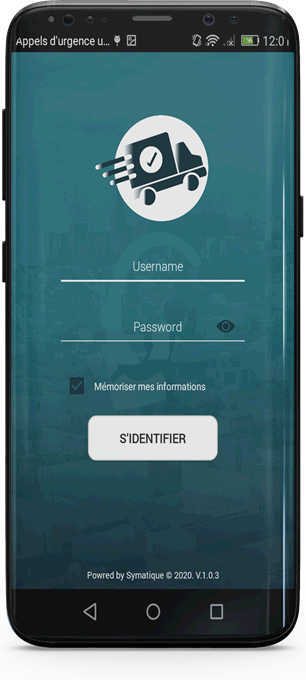
- They open the day with their credentials
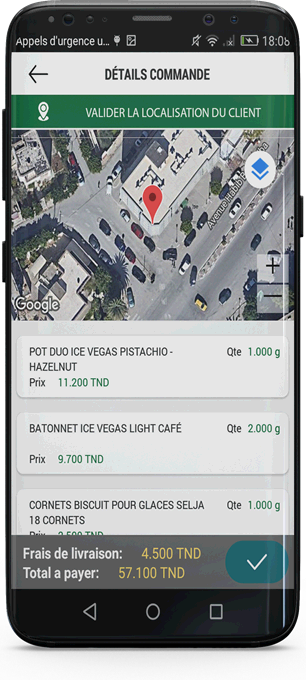
- They validate the customer's location on the map
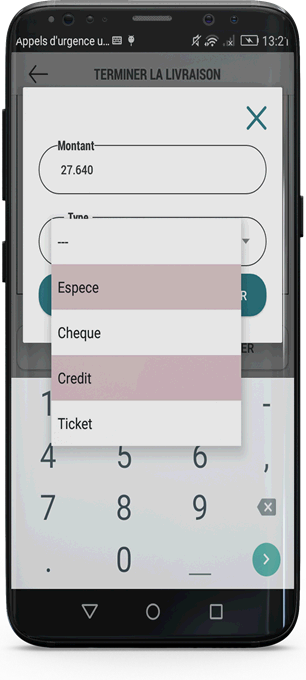
- They enter the amount and the payment method
- They take the signature, and the note closes
The note opens at the door, and closes before driving off
The address, the lines, the charges, the total: it is all on screen before unloading.
Delivery charges have a line of their own
They appear separately, below the items, and count towards the total to pay. The customer sees what they are paying, and why.
The address, then the coordinates
The customer file carries the delivery addresses and their GPS coordinates. The delivery driver does not hunt for the door: the map asks them to confirm they are standing at the right one.
What the customer signs, they have just seen
The order details were on screen a moment earlier: the items, the quantities, the prices, the delivery charges. The signature does not rest on a total announced out loud.
What the delivery driver has in front of them
- 1marker on the map: the customer's address, to be validated before unloading
- 2separate amounts: the delivery charges, then the total to pay
- 3steps to close the note: the amount, the payment method, the signature
The note does not close on a promise
The amount, the payment method, the signature. Then Finish.
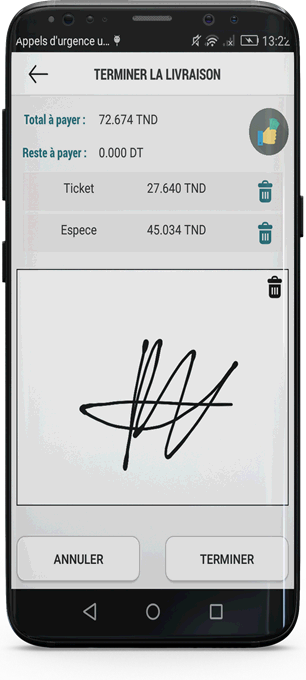
The closing screen shows the total to pay and the amount left to pay. Each payment recorded is added to it with its method and its amount, and can be deleted with a single tap as long as the note is not closed. A single note can therefore be settled in several instalments and by several methods: on the screenshot, a ticket for 27.640 dinars and 45.034 dinars in cash cover the 72.674 dinars due, and the amount left to pay falls to zero.
What the screen keeps
- The total to pay — the one on the note, delivery charges included
- The amount left to pay — it falls with every payment recorded
- Each payment — its method and its amount, each erasable on its own
- The signature — drawn on the screen, erasable too
- Two ways out — Finish, or Cancel
Payment methods are set in the back office. The delivery driver offers only the ones you have opened.
A refused delivery is information, not an incident
The reason is chosen from a list you write yourself. The goods come back with it.
A round does not always go to plan. The customer is out, the order does not match, the sales point is closed, the goods are refused. With no tool, these cases are written by hand on the note and get lost in the bundle; you know there was a problem, you do not know which one, nor how many times.
The reasons for refusing or cancelling a delivery are fully configurable in the back office. You are the one who writes that list, so you are the one who decides what will be counted at the end of the month. A reason nobody has planned for never comes back.
What does not get delivered
- The refused delivery, with its reason
- The cancelled delivery, with its own
- The reasons, written in the back office and nowhere else
What comes back to the depot
- Goods returns, a module in its own right
- The state of the truck stock, available during the round
- What was unloaded, and what never left the tailgate
Eight modules, with the delivery driver's day as the only thread
None is compulsory. The round and the delivery note are enough to get started.
Delivery is one module among twelve in Smart ORDER, where the customer tracks, from home, the orders they have placed. Here it is the whole application, and it is in the other hand: the hand of the one who unloads. The catalogue, the invoice, the delivery note, the cash and the return are the subject here, not a heading.
The round 2
-
PlanningThe rounds, prepared before setting off
-
StockThe state of the truck stock
The customer 2
-
Customer cardThe customer file, updated in real time
-
OrdersCustomer orders and their status
The sale 2
-
Product catalogueA rich item record, updated in real time on mobile devices
-
Invoice and delivery noteSelling by invoice, by delivery note, or both
The closing 2
-
Cash statementManagement of customer payment collection
-
Goods returnsWhat leaves again with the truck, recorded like everything else
Head office no longer rings to find out where the truck is
Delivery drivers are geolocated, and deliveries are tracked in the field in real time.
That is what the Deliveries module in the Smart SALES back office does: geolocate your delivery drivers and track the deliveries of your customers' orders in the field, in real time. The goods are traced from the company through to the end customer, and delivery routes are optimised on what the round actually did, not on what people think it did.
What the back office receives
- The position of the delivery drivers — in the field, in real time
- The status of each delivery — delivered, refused, cancelled, with its reason
- The payments collected — their method and their amount, note by note
- The returns — the goods that leave again with the truck
- The addresses and their coordinates — the file grows richer with every visit
On the customer side, the same delivery is visible without anyone picking up the phone: the Deliveries module in Smart ORDER shows them which of their orders are on the way.
Online or offline, on the phone that goes with the truck
The network is often missing where the goods arrive. The application does not wait.
Smart DELIVERY works online and offline alike. A delivery driver who loses the network in an industrial zone or in a basement does not lose the delivery: they unload, they collect payment, they take the signature, and everything goes up at the next synchronisation.
The interface is touch-based and intuitive, suited to tablets as much as to smartphones. The operating platform is Android; SYMATIQUE also presents Smart DELIVERY as a Web and Android application, the web part being the one head office tracks from.
The application is connected to the Smart SALES back office: master data for customers and their addresses, planned rounds, catalogue, authorised payment methods, reasons for refusal, consolidation of payments collected and returns. It is through it that the exchanges with your management system pass, and that system stays in place.
For this solution the publisher states a better customer experience, reduced costs and risks, a productivity gain and a quick return on investment. These are stated objectives, and it is as such that they are reported here.
- Smart ORDERB2B and B2C order taking
- Smart PAYMENTCollections and payments
-
Smart FLEETVehicle fleet management Coming soon
What people ask us before the first round
Smart PAYMENT goes after a debt already incurred: the collections agent opens the customer's account and presents the documents still owed. Smart DELIVERY is the application of the one who unloads: the goods, the address to validate, the delivery note, the payment taken at the door and the signature. Both collect money, but not at the same point in the life of the order.
Yes. Smart DELIVERY works online and offline alike. The delivery driver runs the round with no network and the data goes up to the back office as soon as the connection comes back.
On Android smartphones and tablets. The touch interface adapts to different screen sizes, for use standing up, one hand on the device and the other on the parcel.
The closing screen offers cash, cheque, credit and ticket. Several payments can settle a single note: the amount left to pay falls with every entry, and each line stays erasable as long as the delivery is not finished. Payment methods are configured in the back office: the delivery driver offers only the ones you open.
The delivery driver records the refusal with its reason. The reasons for refusal and cancellation are fully configurable in the back office: you are the one who writes the list. The goods that leave again are handled by the returns module.
A delivery round replayed on your own notes
Three customers, two payment methods, one signature. Forty-five minutes, no commitment.
- A demonstration using your own customers, your items and your delivery addresses
- A technical contact, not a salesperson
- A reply within one working day
- Your data is used only to reply to you