

Your customers order on their own, and the order arrives already keyed in
Smart ORDER is the order taking application in the Smart SALES suite. The customer opens the catalogue, sees their prices and promotions, fills their basket and orders. The order enters your approval workflow, then goes out for delivery. Smart ORDER is B2B ordering software for distributors and their customers.







One order by telephone, another by WhatsApp, a third by email
Retrieving orders takes time because they never arrive through the same place.
That is the observation Smart ORDER starts from: many companies lose time retrieving their orders, because those orders reach them through several interfaces at once. The application connects customers to a single one, where orders are retrieved and centralised in real time.
Nothing is copied over from one channel to another. From there, three jobs stop waiting.
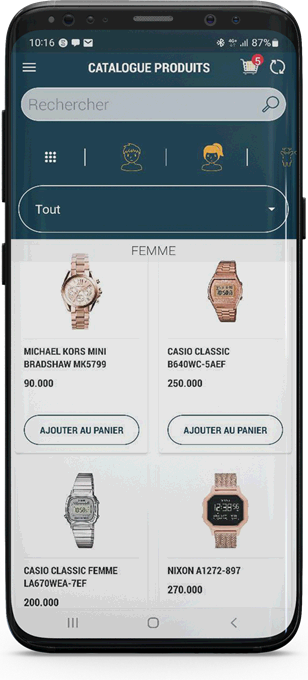
They open the catalogue when they have time, see their prices and their promotions, fill their basket and order. Without calling anyone.
What the customer holds Your sales departmentEvery order received arrives in the same place. They go through the approval workflow, then go out for delivery — without a single rekeying.
The order's workflow Your managementCurrent business is read as it happens. Errors are isolated before they turn into disputes, and the history prepares next month's stock.
What management seesThe basket fills up at the customer's
They know your items, their prices, their promotions. They order when they have time, not when you pick up the phone.
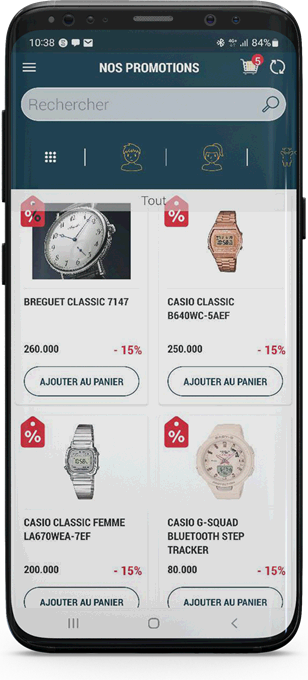
The catalogue, arranged like your range
The category tree is yours: family, range, category, as many levels as you need. Whole categories can be reserved for one customer or for a group of customers.
- Item — managed by its code, by its barcode, or by both
- Product sheet — a detailed description and several photos
- Measure — litre, kilogram, piece, box, man per day
The product sheet is updated in real time: what the customer has in front of them is what you have published, not last year's catalogue.
The price shown is their own
Prices follow the customer type, and a special price can be reserved for one account or a few. VAT, packaging and units of measure are set in the same way.
Promotions go where they are useful
By item, by category, by delegation, by customer or by group of customers — and distinct from the catalogue, which opens a sales channel without touching the rest.
What the customer does without calling anyone
- Search for an item in the catalogue
- See the promotions that are open to them
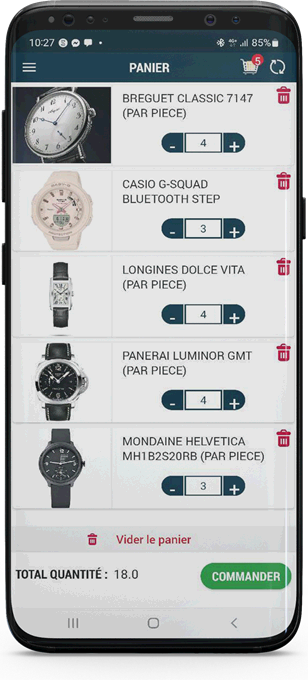
- Adjust quantities, line by line
- Empty the basket and start again
- Send the order
- Track its status, right through to delivery
One order, then the next
The history stays available from the application, every order with its status. Forecast orders can be displayed there too.
What they used to ask you on the phone, they now read for themselves
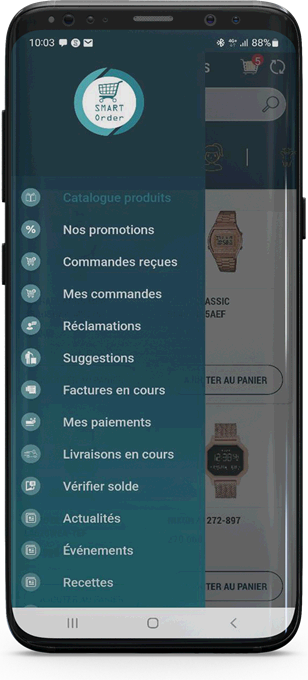
The Smart ORDER menu is not a sales rep's menu. Every entry is written from the customer's point of view: their orders, their invoices, their payments, their deliveries. They no longer call to find out where their case stands; they open the application.
What they look up on their own
- Their balance — checkable at any time
- Their outstanding invoices — what they still have to pay
- Their payments — the history of their purchase movements
- Their deliveries — the ones on their way
- Your news — what you launch, what you announce
Twelve modules, opened at the pace you choose
None is compulsory. The catalogue and the order are enough to start; the rest opens when you decide to show that information.
Every module you open is one less reason to call you, and one more piece of information the customer can check on their own. It is the same movement on both sides: what they look up is what you no longer key in.
Order 3
-
Product catalogueA rich item sheet, updated in real time
-
PromotionsBy item, by category, by delegation, by customer
-
OrdersThe status of each one, known in real time
Receive 2
-
DeliveriesTracking of the deliveries for their orders
-
StockProduct levels, before even ordering
Pay 2
-
Outstanding invoicesWhat is left to pay, visible at any time
-
My paymentsThe history of their purchase movements
Speak 5
-
ComplaintsSent and tracked according to their type
-
SuggestionsIdeas for improving the service
-
SurveysYour questions, and the behaviour they reveal
-
FAQA reliable answer to the questions that keep coming back
-
News and eventsWhat your company announces, where they are
Received is not approved
Between the order the customer sends and the one that goes out for delivery, there are your rules.
The approval workflow is fully configurable: as many levels as you need, and the criteria you judge useful. Every case that calls for a ruling then has its stopping point, instead of coming back up as a phone call.
Order statuses are defined from the back office. They are what the customer reads when checking where their order stands, and they are what tells your teams what still has to be done.
Received
It arrives in the platform the moment the customer confirms it, with its lines, its quantities and its discount. Nobody keys it in again.
Approved
It passes the levels and the criteria you have defined. A discount margin can be granted customer by customer.
Routed
It is broken down, then routed to the systems and the resources that will process it. Delivery follows, and the customer watches it move.
Comparing what was ordered with what was approved, then with what was delivered, means measuring your rate of service without building a separate tracking sheet. The workflow produces the measure as it works.
A complaint lodged, an answer that comes back
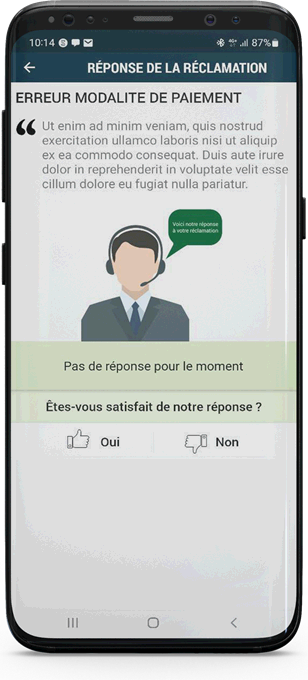
An item, an invoice, a driver, an account: the customer reports it at the point where the problem happened.
Complaints are classified by type and by nature, and the natures are configured by kind. One or more photos can be attached depending on the nature — a damaged parcel is better seen than described.
You choose who sees them in the back office: the departments, the individuals. You also choose the addresses notified, in real time, at every new entry. So a complaint does not sit unread in a shared mailbox.
The answer comes back in the application, under the complaint, and the customer then says whether it satisfies them. Suggestions follow the same path: an idea for improvement goes up to where it will be read.
The orders in progress, not last month's
Supervise in real time, isolate errors, and see the stock-out coming before it arrives.
All the orders are supervised in real time. Errors are isolated instead of spreading: that is what allows you to correct a process rather than patch up a dispute, one order after another.
The order history is used to prepare stock. You know what customers ask for and at what pace, so what has to be guaranteed to avoid a stock-out. Forecast orders can be displayed.
What management looks at
- Current business, at the very moment it opens them
- Corrective action, anticipated rather than suffered
- Sales forecasts, held up by real orders
On the phone they already have, with or without a network
The application works online and offline alike, on a tablet as on a smartphone.
Smart ORDER works online and offline alike. A customer who loses the network does not lose their ordering session.
The interface is touch-based, designed for the tablet and the smartphone — not for a desktop screen shrunk by half. The operating platform is Android.
The application is connected to the Smart SALES back office: master data, prices, approval workflows, consolidation of the data in real time. It is through the back office that exchanges with your management system pass, and that system stays in place.
What people ask us before opening the first customer account
Your customer. They order from their own account, with their prices and their promotions. Your teams receive the order in the platform and move it along the workflow.
No. The application works online and offline alike, and the data goes up at the next synchronisation.
On Android smartphones and tablets. The interface is touch-based, designed for both formats.
Smart CRM is the application the sales rep uses on a visit. Smart SELLER is the one for the mobile trader, who sells the goods they carry with them. Smart ORDER is your customer's: here, it is the customer who places the order.
Yes. The levels, the criteria and the order statuses are configured from the back office, as is the discount margin granted to each customer. Your own management system stays in place: the exchanges go through Smart SALES.
An order placed by you, received in front of you
We open a demonstration account with your own items and your prices. You place an order, it arrives, it goes through the workflow. Forty-five minutes, no commitment.
- A demonstration on your own items, prices and discounts
- A technical contact, not a salesperson
- A reply within one working day
- Your data is used only to reply to you